
An SRT file is a subtitle file: plain text that lists each line of dialogue with the time it appears and disappears on screen. Video players, YouTube and most video editors read it and show the text over the video, and viewers can turn it on or off. SRT stands for SubRip Subtitle, after SubRip, the free Windows program that copied subtitles off DVDs and saved them in this format. Because it's so simple, it became the subtitle format almost everything accepts.
What an SRT file looks like
Open one in any text editor and you'll see blocks like these:
1
00:00:01,000 --> 00:00:03,500
Welcome back to the channel.

2
00:00:03,600 --> 00:00:06,200
Today we're making subtitles
from scratch.

3
00:00:06,400 --> 00:00:08,000
<i>Let's go.</i>
Each block has four parts:
- A number. The blocks count up from 1, in order.
- The start and end time, separated by
-->. Times are written as hours:minutes:seconds,milliseconds, so00:01:05,250is one minute, five and a quarter seconds. SRT uses a comma before the milliseconds; VTT files use a period. - The text, on one or two lines. Most players also understand
<i>,<b>and<u>for italic, bold and underlined words. - A blank line, which ends the block.
That's the whole format. There's no header, and no settings for font, color or position: the player decides how the subtitles look, usually white text at the bottom of the picture.
What SRT files are used for
- Subtitles you can turn on and off. Upload an SRT next to a video on YouTube, Vimeo, Facebook or LinkedIn and viewers get a CC button. These are often called closed captions.
- Subtitles for downloaded films and shows. Players such as VLC load an SRT that sits next to the video file.
- Translations. Each language is its own SRT file with the same timings, so translators work on text alone.
- Moving subtitles between apps. Premiere Pro, DaVinci Resolve, Final Cut Pro and most other editors import and export SRT.
- Search and accessibility. The file is a timed transcript of the video, which helps Deaf and hard-of-hearing viewers and gives platforms text to index.
What an SRT file doesn't do is change the video itself. The subtitles stay in a separate file and only show in players that load it. TikTok and Instagram don't take subtitle files at all. For those, the subtitles have to be burned into the picture (see below).
How to make an SRT file
There are three ways, from fastest to slowest.
Automatically, from the video's speech
A subtitle generator listens to the video and writes the SRT for you, timings included. With AutoSubtitles, in your browser:
- Open autosubtitles.com, click New Video and choose your video. Leave the language on Auto Detect or pick it.
- Check the subtitles. They appear a few seconds later, line by line with their timings. Click any line to fix a word or change its timing.
- Download the file. Click the arrow next to Export, then choose .srt under Download subtitles.
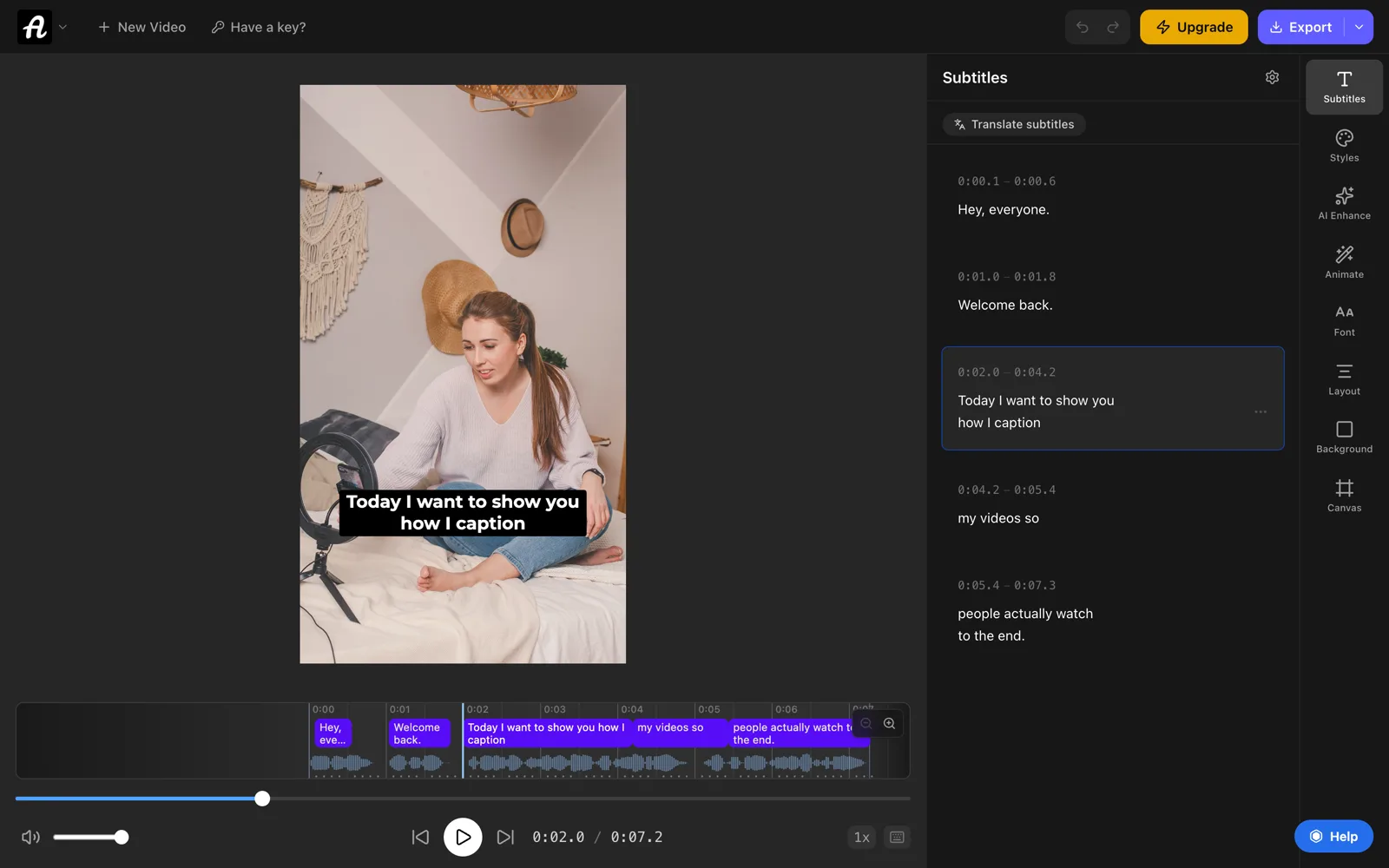
Writing and editing the subtitles is free. Downloading them as SRT, VTT or TXT files is part of Pro ($9/month). On the free plan you can still export the video with the subtitles burned in, up to 720p with a small watermark. More on the SRT generator page.
With a free online subtitle editor
If you'd rather type the subtitles yourself, our free subtitle editor keeps the numbers and time format right for you:
- Click Start a new file, then Add your video to check the timing so it plays next to the list.
- Play the video and click Add subtitle here where each line starts. Type the text, then pause where it stops and click Set end here.
- Click Download .srt.
It runs in your browser, so neither the video nor the subtitles are uploaded anywhere.
By hand, in a text editor
Any plain-text editor works. Type the blocks exactly as in the example above, then save:
- Windows (Notepad): choose File → Save as, set Save as type to All files, set Encoding to UTF-8, and name the file
video.srt. If Windows adds.txtto the end, the file won't load as subtitles. - Mac (TextEdit): choose Format → Make Plain Text first, then save and name the file
video.srt. Choose Use .srt if TextEdit asks which extension to keep.
Do it this way only for a handful of lines. Finding the exact time each sentence starts and ends is slow, and a typo in one timing line can stop a whole file from loading.
How to open an SRT file
- To read or edit the text: open it in Notepad, TextEdit or any code editor. On a Mac, if double-clicking opens the wrong app, right-click the file and choose Open With → TextEdit.
- To edit it next to its video: open it in the subtitle editor. You can fix words, change timings and find and replace across the file, then save it again as SRT or VTT.
- To watch it with a video: give it the same name as the video file (
talk.mp4andtalk.srt) and keep both in the same folder. VLC loads it automatically. You can also open the video in VLC and choose Subtitle → Add Subtitle File.
An SRT file opened in Word or Google Docs is easy to break. Those apps can turn straight quotes into curly ones and save in their own format, so stick to a plain-text editor.
How to add an SRT file to a video
There are two kinds of subtitles, and an SRT file gives you the first:
- Closed captions (a separate file). The SRT stays separate, and the player shows it. Viewers can switch it off, and platforms can translate it.
- Burned-in subtitles (open captions). The text is drawn into the video picture, so everyone sees it, in every app and every repost, in the font and colors you choose.
Not sure which you need? See open captions vs closed captions.
On YouTube: in YouTube Studio, open Subtitles in the left menu and click your video. Add the video's language if asked, click Add in the Subtitles column, choose Upload file, select With timing, pick the SRT and click Publish.
On Vimeo, Facebook and LinkedIn: each has an upload option for subtitle or caption files in its video settings. Facebook also expects the language in the file name, such as video.en_US.srt.
Burned in, for TikTok, Reels and Shorts: a video editor can import the SRT and render it into a new video file. In AutoSubtitles you don't need the SRT for this: it writes the subtitles from the video's audio, and you export the video with them burned in, in any of 28 caption styles. Our guide on how to add subtitles to a video covers every platform step by step.
SRT vs VTT and other subtitle formats
| Format | What it is and where it's used |
|---|---|
| SRT .srt | Numbered blocks with comma timings, and no styling or positions. Works almost everywhere: YouTube, Vimeo, Facebook, LinkedIn, VLC and video editors. |
| VTT .vtt | WebVTT. Starts with a WEBVTT line, uses period timings, and can set position and style. Used by video players on websites and online course platforms. |
| SBV .sbv | YouTube's older caption format, with no numbers and a comma between the start and end time. Found in old YouTube caption downloads. |
| ASS/SSA .ass | Advanced SubStation Alpha. Full fonts, colors, positions and effects. Used for styled film and anime subtitles in players such as VLC and mpv. |
| TXT .txt | Plain text with no timings. Used for transcripts, show notes and blog posts. |
If a platform wants a different format, convert it rather than retyping it. Our free converters run in your browser: SRT to VTT, VTT to SRT, SRT to TXT, or the subtitle converter for SBV files.
Common SRT problems and how to fix them
- Strange characters such as é instead of é. The file was saved in a different text encoding. Open it in a text editor and save it again as UTF-8. Our converter and editor read older Windows and UTF-16 files and save UTF-8.
- The player or platform won't load the file. Check that the name ends in
.srtand not.srt.txt, that every block has a number, a timing line and a blank line after it, and that the times use a comma before the milliseconds. - Every subtitle is early or late by the same amount. Shift the whole file. The subtitle shifter moves every line earlier or later in one go.
- The subtitles start in sync and drift further out. The file was made for a video with a different frame rate, for example 25 fps instead of 23.976. The subtitle shifter has a frame rate fix for this.
- Two subtitles show at once. One line ends after the next one starts. The subtitle editor marks every overlap so you can fix the times.
Frequently asked questions
What does SRT stand for?
SubRip Subtitle, sometimes written SubRip Text. It's named after SubRip, a Windows program that copied subtitles off DVDs and saved them in this format.
What opens an SRT file?
Any text editor, such as Notepad on Windows or TextEdit on a Mac, shows the text. To watch it with a video, use a player that loads subtitle files, such as VLC. To edit it next to the video, use a subtitle editor.
Are SRT files closed captions?
Usually, yes. An SRT file is a separate file that the player shows on top of the video, so viewers can turn it on or off. That's what closed captions are. Strictly, captions also describe sounds, like [music], but SRT files are used for both (see closed captions vs subtitles). An SRT file written that way, with sounds and speaker names in square brackets, is an SDH subtitle file.
Can I make an SRT file for free?
Yes. Type it in a text editor, or use our free online subtitle editor, which keeps the numbers and timings in the right format. To have the subtitles written from the video's speech, AutoSubtitles does that for free; downloading them as an SRT file is part of Pro.
How do I convert an SRT file to text?
Use the free SRT to TXT converter. It removes the numbers and timings and leaves the words, one subtitle per line. It runs in your browser, so the file isn't uploaded.
Can an SRT file change the font or color of subtitles?
Not reliably. SRT has no styling beyond italic, bold and underline, and some players ignore even those. To choose the font, colors and animation, burn the subtitles into the video instead.