
A VTT file is a subtitle file: plain text that lists each line of dialogue with the time it appears and disappears on screen. The full name is WebVTT, short for Web Video Text Tracks. It's the caption format built into web browsers, and the one HTML5 video players, online course platforms and Zoom and Microsoft Teams meeting transcripts use. A VTT file works like an SRT file, but it starts with a WEBVTT line and can also say where each line sits on screen and how it looks.
What a VTT file looks like
Open one in any text editor and you'll see something like this:
WEBVTT

00:00:01.000 --> 00:00:03.500
Welcome back to the channel.

00:00:03.600 --> 00:00:06.200
Today we're making subtitles
from scratch.

intro-3
00:00:06.400 --> 00:00:08.000 line:10%
<i>Let's go.</i>
The parts are:
- The
WEBVTTline. Every VTT file must start with it. Without it, players refuse the file. - Cues. Each block of text is called a cue, and cues are separated by a blank line.
- An optional name for the cue, like
intro-3above. Most files have none, or just a number. - The start and end time, separated by
-->. Times are hours:minutes:seconds.milliseconds with a period before the milliseconds (SRT uses a comma). The hours can be left out, so01:05.250is also valid. - Optional settings after the time.
line:10%moves that cue near the top of the picture. Others areposition,alignandsize. - The text, on one or more lines.
<i>,<b>and<u>make words italic, bold or underlined.
VTT files are always saved as UTF-8 text, so accented letters and other alphabets work without any setup.
What else can be in a VTT file
- Notes. A block that starts with
NOTEis a comment. Players ignore it. - Speaker names.
<v Sam>Hi, everyone</v>marks who's speaking. Zoom and Teams transcripts use this. - Styles. A
STYLEblock holds CSS for the captions, such as a font or color. Browsers use it; many players ignore it. - Word timings. A time inside the text, like
<00:00:02.000>, lets players highlight words as they're spoken, karaoke style.
What VTT files are used for
- Captions on your own website. The video player in every browser shows captions only from a VTT file, added with the
<track>tag (see below). - Video platforms. YouTube and Vimeo accept VTT caption files. So do video hosts and players built for websites and courses.
- Online courses. E-learning tools such as Articulate Storyline and most course platforms take VTT captions.
- Meeting transcripts. Zoom saves the transcript of a cloud recording as a
.vttfile, and Teams lets you download meeting transcripts as.vtt, with each speaker's name. - Accessibility. A caption file lets Deaf and hard-of-hearing viewers follow the video, and viewers can turn it on or off with the CC button. That makes VTT captions closed captions.
Like an SRT file, a VTT file doesn't change the video. The captions stay in a separate file and only show in players that load it. TikTok and Instagram take no caption files at all; there, captions have to be burned into the picture.
VTT vs SRT: what's the difference?
| Difference | SRT and VTT |
|---|---|
| First line | SRT: none. VTT: WEBVTT. |
| Time format | SRT: 00:00:01,000 with a comma. VTT: 00:00:01.000 with a period. |
| Cue numbers | SRT: required, counting up from 1. VTT: optional, and can be any name. |
| Position and style | SRT: none; the player decides. VTT: position, alignment, CSS styles and speaker names. |
| Works in | SRT: YouTube, Facebook, LinkedIn, video editors and media players. VTT: web browsers, YouTube, Vimeo and course platforms. |
Which should you use? If you're putting captions on a video on your own website, use VTT, because that's what browsers read. For video editors, Facebook and LinkedIn, use SRT. YouTube and Vimeo take either. When in doubt, keep both: our free SRT to VTT and VTT to SRT converters switch between them in a second.
How to open a VTT file
- To read the text: open it in Notepad on Windows or TextEdit on a Mac (right-click the file and choose Open With). Any code editor works too.
- To edit it next to its video: open it in the free subtitle editor. You can fix words and timings while the video plays, then save it as VTT or SRT.
- To watch it with a video: open the video in VLC and choose Subtitle → Add Subtitle File, then pick the
.vtt. If you give the VTT the same name as the video and keep them in the same folder, VLC loads it by itself. - To get just the words: the free VTT to TXT converter removes the
WEBVTTline, times and tags and leaves the text, one line per caption. Speaker names from Zoom and Teams stay at the start of each line.
Avoid opening a VTT file in Word or Google Docs if you plan to use it again. They can change quotes and save in their own format, which breaks the file.
How to make a VTT file
Automatically, from the video's speech
A subtitle generator listens to the video and writes the captions for you, with timings. With AutoSubtitles, in your browser:
- Open autosubtitles.com, click New Video and choose your video. Leave the language on Auto Detect or pick it.
- Check the captions. They appear a few seconds later, line by line with their timings. Click any line to fix a word or change its timing.
- Download the file. Click the arrow next to Export, then choose .vtt under Download subtitles.
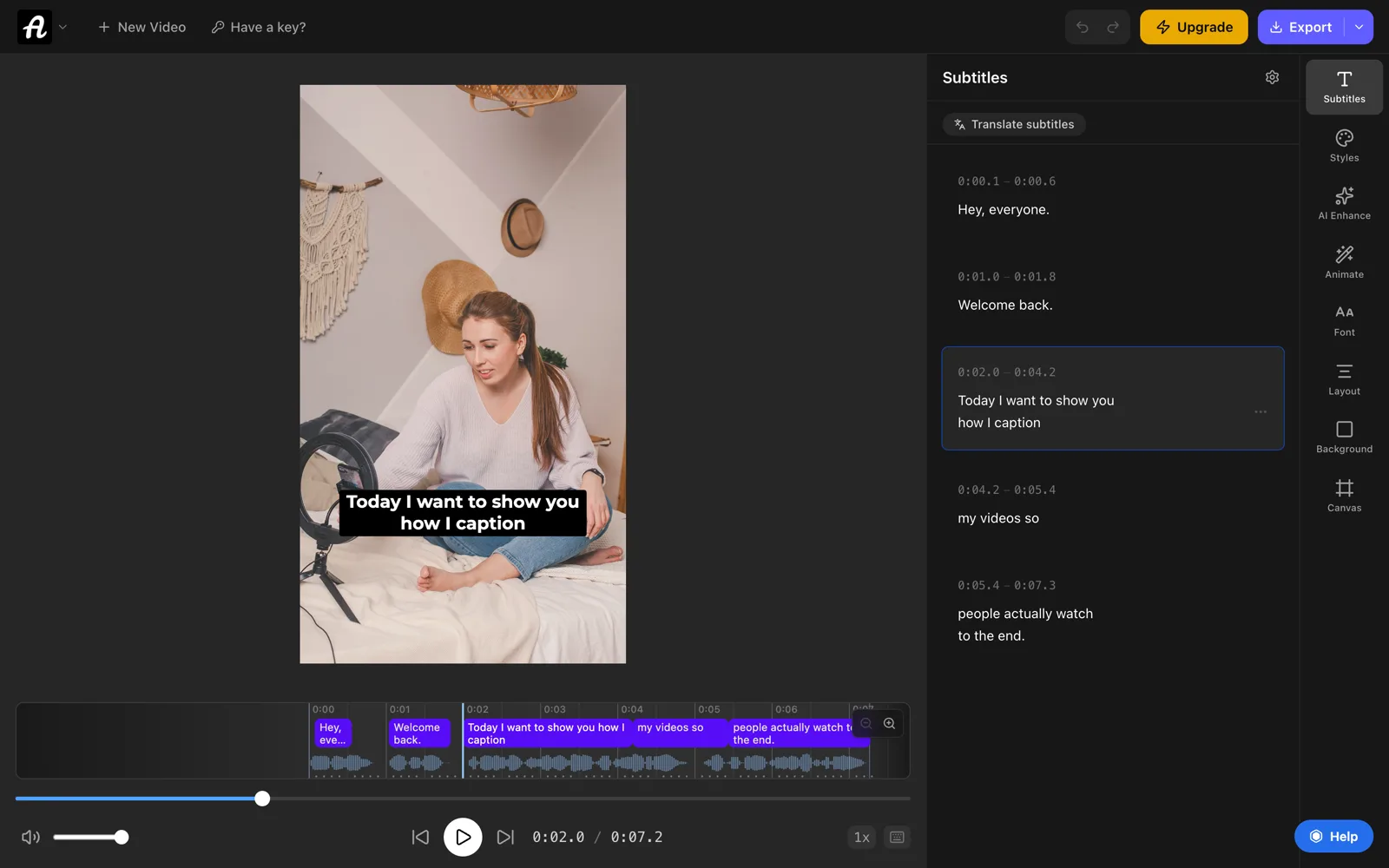
Writing and editing the captions is free. Downloading them as VTT, SRT or TXT files is part of Pro ($9/month). On the free plan you can still export the video with the captions burned in, up to 720p with a small watermark.
With a free online subtitle editor
To type the captions yourself, use our free subtitle editor. Click Start a new file, add your video so it plays next to the list, and click Add subtitle here where each line starts. When you're done, pick VTT next to the download button and click Download .vtt. It runs in your browser, so neither the video nor the captions are uploaded.
From an SRT file you already have
Drop the .srt into the free SRT to VTT converter and click Download .vtt. It adds the WEBVTT line, removes the numbers and changes the commas in the times to periods. Renaming .srt to .vtt isn't enough: the header and time format are different, and browsers will refuse the file.
By hand, in a text editor
Type WEBVTT, a blank line, then your cues as in the example above. Save it as plain text with UTF-8 encoding and a name ending in .vtt. In Notepad, set Save as type to All files so Windows doesn't add .txt. In TextEdit, choose Format → Make Plain Text first.
How to add a VTT file to a video
On your own website: put the VTT file next to the video and add a <track> inside the <video> tag:
<video controls src="talk.mp4">
  <track kind="captions"
    src="talk.vtt"
    srclang="en"
    label="English"
    default>
</video>
The browser shows a CC button, and default turns the captions on from the start. Your server should send the file as text/vtt, and if the VTT is on another domain, that domain has to allow it.
On YouTube: in YouTube Studio, open Subtitles, choose your video, click Add in the Subtitles column, choose Upload file, select With timing and pick the .vtt.
On Vimeo: open the video's settings and find Subtitles (under Distribution). Click +, choose the language and type, and upload the .vtt.
On Facebook, LinkedIn and in video editors: most want SRT. Convert the file with the VTT to SRT converter first. Positions and styles are dropped, since SRT can't hold them.
Burned in, for TikTok, Reels and Shorts: these apps don't load caption files, so the words need to be part of the picture. AutoSubtitles writes the captions from the video's audio and exports the video with them burned in, in any of 28 caption styles. See how to add subtitles to a video for every platform.
Common VTT problems and how to fix them
- The player won't load the file. Check that the first line is exactly
WEBVTT, that the times use a period before the milliseconds, and that there's a blank line between cues. A file that's really SRT with a.vttname fails this way. - Captions don't show on your website, but the file looks fine. The browser may be blocking it. Check that the server sends it as
text/vttand, if it's on another domain, that the domain allows it (addcrossoriginto the<video>tag). - Strange characters such as é instead of é. The file wasn't saved as UTF-8. Open it in a text editor and save it again as UTF-8.
- Every caption is early or late by the same amount. The subtitle shifter moves every line earlier or later in one go, and saves VTT again.
- Two captions show at once. One cue ends after the next starts. The subtitle editor marks every overlap so you can fix the times.
Frequently asked questions
What does VTT stand for?
Video Text Tracks. The format's full name is WebVTT, Web Video Text Tracks. It was created for captions in web browsers and grew out of the SRT format.
How do I open a VTT file?
Any text editor, such as Notepad on Windows or TextEdit on a Mac, shows the text. To watch it with its video, load it in VLC with Subtitle → Add Subtitle File. To edit it next to the video, use a subtitle editor.
Is a VTT file the same as an SRT file?
No, but they're close. Both list caption text with start and end times. VTT starts with a WEBVTT line, uses a period instead of a comma in the times, and can set position and style. SRT works in more video editors; VTT is what web browsers read.
How do I convert a VTT file to SRT?
Use the free VTT to SRT converter. It removes the WEBVTT line, notes and position settings, numbers each caption, and changes the periods in the times to commas. It runs in your browser, so the file isn't uploaded.
How do I convert a VTT file to text?
Use the free VTT to TXT converter. You get the words with no times or tags, one caption per line, and speaker names from Zoom and Teams transcripts stay in.
Can I just rename a .srt file to .vtt?
No. Browsers check for the WEBVTT line and the period in the times, so a renamed SRT file usually won't load. Convert it instead with the SRT to VTT converter.
Can ChatGPT read a VTT file?
A VTT file is plain text, so any AI assistant that reads text files or pasted text can read it. To give it just the words, without times and tags, convert it to TXT first.
Can I make a VTT file for free?
Yes. Type it in a text editor, or use our free online subtitle editor, which keeps the time format right and saves .vtt. AutoSubtitles also writes the captions from your video's speech for free; downloading them as a VTT file is part of Pro.